ConsolePi Build Guide
Personal project — not Cisco-official
This build guide is a home lab recipe layered on top of the open-source ConsolePi project by Wade Wells. Built by a Cisco employee on their own time using publicly documented console interfaces. Not affiliated with, endorsed by, sponsored by, or representing Cisco Systems, Inc.
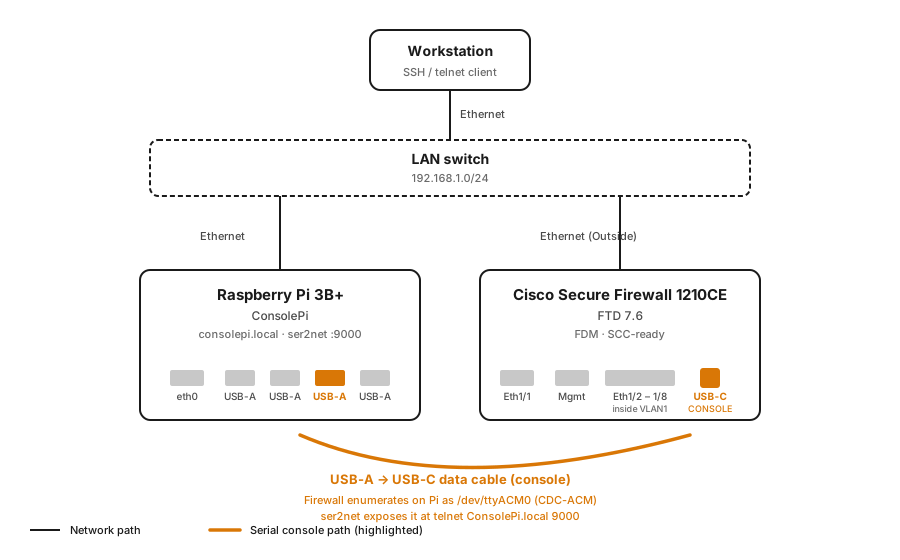
A tested, opinionated recipe for turning a Raspberry Pi into a network-accessible serial console server, running ConsolePi on Raspberry Pi OS 13 (Trixie).
What you'll end up with
A quiet, low-power box that:
- Presents attached serial adapters as telnet ports over your LAN
- Serves both traditional RJ45 console (via USB→serial adapters) and modern USB-C console ports (native CDC-ACM) that ship on newer Cisco gear (1200/3100/4200 Secure Firewalls, Catalyst 9000 switches)
- Auto-advertises via mDNS as
consolepi.local - Runs
consolepi-menufor a friendly per-adapter session picker - Costs about $85 in parts
Pair it with a smart plug on the target device's power feed and you have "poor man's Opengear" — remote console and remote power cycle for any device in your rack, at a fraction of the cost of enterprise console servers.
Who this is for
- Network engineers, SEs, and lab operators who want an inexpensive OOB management server
- Anyone standing up modern Cisco firewalls (1200/3100/4200 series) or switches with USB-C console who needs a stable console access path
- Homelab operators who don't want to keep a laptop plugged into a rack
What this is NOT
- Not a replacement for enterprise console servers if you need serial concentration for 32+ ports, redundant power supplies, or vendor support
- Not a security-hardened production management appliance out of the box — the defaults are lab-friendly; harden for production use
- Not a full rewrite of the upstream ConsolePi docs — this guide focuses on the specific things that trip people up on Trixie and with USB-C consoles
Time budget
| Phase | Time |
|---|---|
| Flash SD card | 5 min (Raspberry Pi Imager) |
| First boot + network up | 3 min |
| SSH in, initial hardening | 5 min |
| Install ConsolePi (silent) | ~10 min |
| Verify + first console session | 5 min |
| Total | ~30 min hands-on, ~45 min elapsed |
Start here
Head to Bill of Materials for the parts list, then walk the guide top-to-bottom.
If you already have a ConsolePi running and just want to connect it to a USB-C console port on a Cisco 1200/3100/4200 or Catalyst 9000, jump to Connect via USB-C.
If something isn't working, Troubleshooting is organized by symptom.
Acknowledgments
This guide stands on the shoulders of the excellent
ConsolePi project by
Wade Wells (Pack3tL0ss). All the heavy
lifting — the installer, ser2net orchestration, mDNS auto-discovery,
consolepi-menu, the REST API — is his work.
This guide is a build recipe layered on top of ConsolePi, focused on:
- What actually works on Raspberry Pi OS 13 (Trixie)
- USB-C console connections to modern Cisco gear
- Silent-install flags for reproducibility
If you find ConsolePi useful, star the upstream repo and consider contributing to it directly — that's where the core work lives.